Google Maps Lead finder: Find & Score Local Business Leads Automatically
Most freelancers and agency owners waste hours every week doing the same mind-numbing task: opening Google Maps, typing a niche, scrolling through dozens of listings, and copying business names, phone numbers, and websites into a spreadsheet - one by one.
There's a better way.
The Google Maps Lead finder is a sales research tool that streamlines prospecting: it systematically searches Google Maps for businesses matching your target criteria, compiles publicly available business information, intelligently scores each prospect by fit and opportunity, and exports a prioritized Excel file organized by sales potential - letting you focus on closing deals instead of manual research.
Here's a complete breakdown of what it does, how it works, and why it saves serious time for anyone doing local business outreach.
Video walkthrough
If you want a quick visual tour before reading the full breakdown, this walkthrough shows the research workflow, the interface, and the export process in action.
The Problem With Manual Lead Research
If you sell web design, SEO, social media management, or really any B2B service to local businesses, your ideal clients have something in common: they're findable on Google Maps.
The challenge isn't finding them. It's doing it at scale.
Manually, here's what the process looks like:
- Search "hair salons in Austin" on Google Maps
- Open 30 listings one by one
- Check if each has a real website (or just a Facebook page)
- Copy their phone number
- Paste everything into a spreadsheet
- Repeat for the next niche or city
That's 2–3 hours of busywork to build one modest prospect list. And the moment you want to target a different city or niche? You start over.
The Google Maps Lead finder eliminates that entire workflow.
What the Tool Does
At its core, the finder does three things:
1. Finds businesses - It searches Google Maps for any keyword + location combination you specify (e.g., "dentists in Chicago," "restaurants in Dubai," "gyms in London"). It systematically surveys the available listings to find prospects matching your criteria.
2. Compiles prospect information - For each business found, it gathers publicly displayed business information: name, category, rating, review count, address, phone number, and website URL.
3. Scores and prioritizes by opportunity - This is the real advantage. Instead of giving you an unsorted list, the tool analyzes each prospect's online presence and assigns a lead score from 1 to 10 based on their likelihood of needing your services.
A restaurant with no website and 12 reviews? High score. A law firm with a polished custom domain and 500 reviews? Low score - they've already got it handled.
How the Lead Scoring Works
The scoring system is built around a simple insight: businesses with weak or missing online presence are the hottest leads for web and digital services.
The tool classifies each business's website into one of three tiers:
| Website Type | Examples | What It Means |
|---|---|---|
| No Website | Listing has no URL | Immediate opportunity |
| Social Media Only | facebook.com, instagram.com, linktr.ee | No real web presence |
| Free Website Builder | Wix, Weebly, Squarespace free tier, Carrd | Amateur online presence |
| Custom Domain | Their own .com or domain | Established presence |
From there, the calculate_lead_score function adds or subtracts points based on:
- No website → maximum base score
- Phone number present → easier to reach = higher value
- Low star rating (under 4.0) → they may need help with reputation management
- Low review count (under 20) → underexposed on Google, possible SEO play
The result is a 1–10 score that prioritizes your outreach list automatically. No more guessing who to call first.
How to Use It
The tool ships with two completely separate interfaces, depending on your workflow.
The Desktop GUI
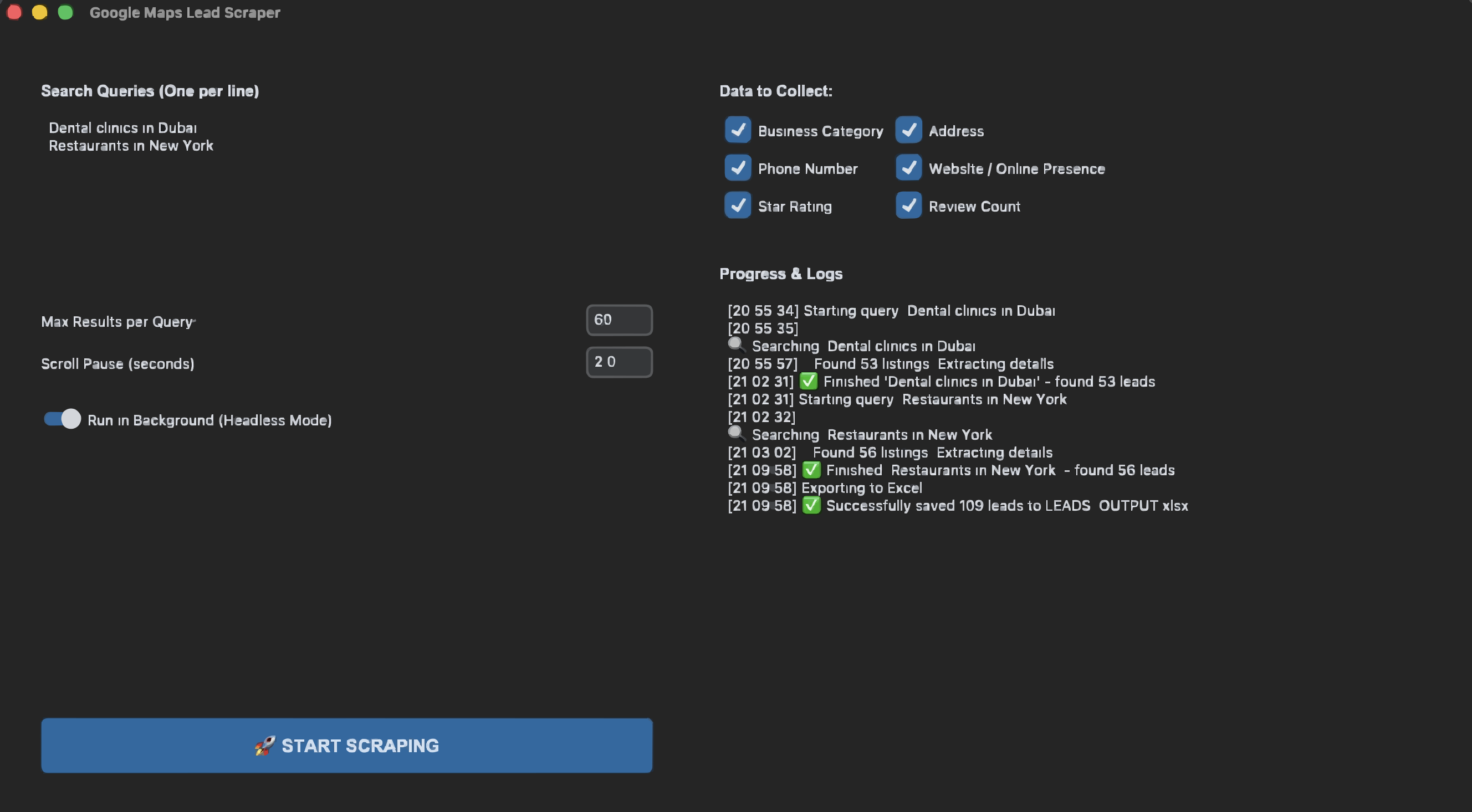
The desktop app is built with CustomTkinter and gives you a clean dark-mode interface where you can:
- Type or paste multiple search queries (one per line)
- Set the maximum number of results per search
- Toggle headless mode (run the browser visibly or silently in the background)
- Hit Start finding and watch leads populate in real time
- Export everything to Excel with one click
The desktop app uses a Playwright-powered Chromium browser to perform the search research workflow, simulating standard browser navigation - scrolling, clicking, and viewing results just as you would manually. You can watch the process in real-time or run it silently in the background.
This mode is best when you're targeting specific cities and niches and want hundreds of leads at once.
The Excel Output: Ready to Work With
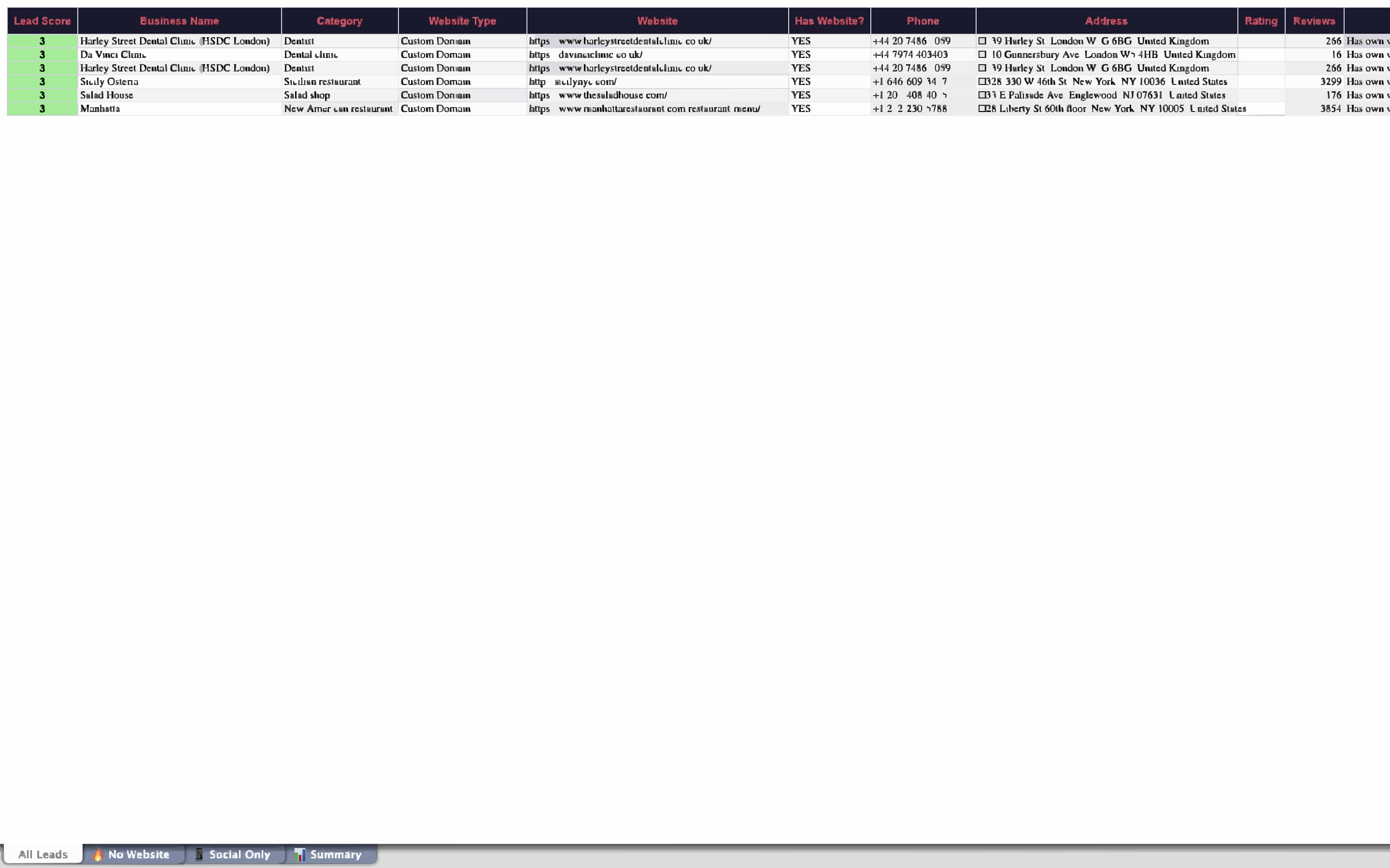
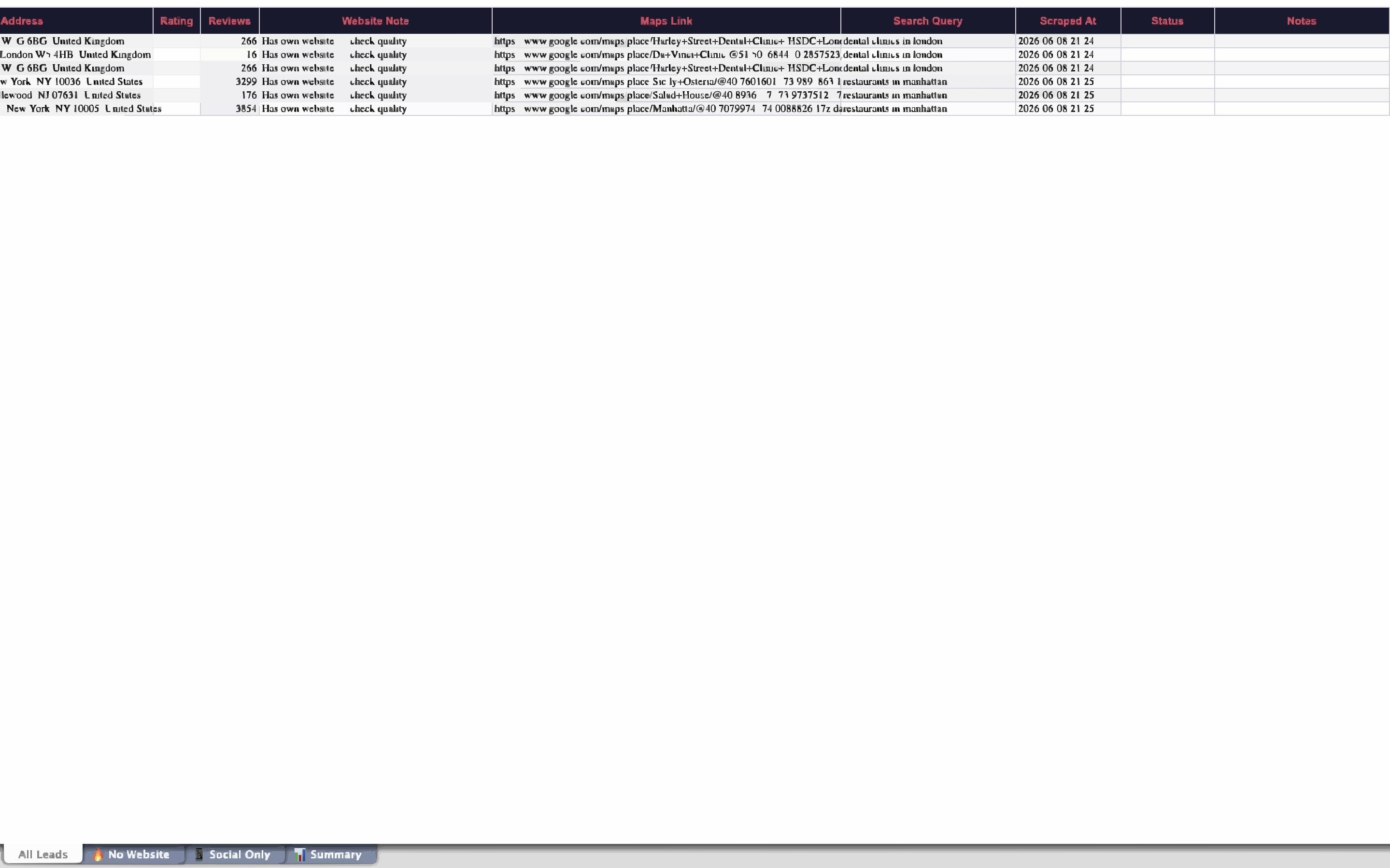
After a research run, the tool exports a file called LEADS_OUTPUT.xlsx with multiple organized sheets:
All Prospects - Every business found, sorted by lead score descending. Includes all contact fields, website type, and opportunity score.
High-Priority Prospects / No Website - Businesses with no dedicated website. Strong candidates for website design, development, or digital services outreach.
Social-Only Presence - Businesses using only a Facebook or Instagram page as their web presence. Ideal targets for branding, web development, or digital strategy services.
Summary - Overview statistics: total prospects identified, breakdown by web presence type, average opportunity score, top business categories.
The spreadsheet comes pre-formatted with colored headers and appropriate column widths - ready to filter, sort, and hand off to a sales team or use yourself.
Getting Started
Download the file after purchasing from:
Requirements
- Python 3.8+
- Playwright (Chromium)
- The packages listed in
requirements.txt
Installation (Mac/Linux)
cd gmaps-lead-finder
./run_for_mac_and_linux.sh
The shell script automatically creates a virtual environment, installs Python dependencies, and runs playwright install chromium so the browser binary is ready.
Installation (Windows)
run_for_windows.bat
Same process - just double-click the batch file.
Quick Start
Once running, open the GUI, type your search queries:
hair salons in Austin TX
barbershops in Nashville TN
nail salons in Phoenix AZ
Set your max results (50–100 is a good start), click Start finding, and let it run. You'll have a scored, formatted Excel sheet within minutes.
Real-World Use Cases
Web Designers & Developers
Filter the Social Only and No Website sheets. These businesses know they need something better - your cold email or call doesn't have to convince them of the problem, just that you're the solution.
SEO Agencies
Target businesses with low review counts and mediocre ratings. They're already falling behind competitors and are receptive to local SEO pitches.
Social Media Managers
Look for established businesses (custom domain, 3+ stars) with large review counts - they have customers and revenue, but may be neglecting their social channels. The sheet makes them easy to filter.
Agencies & Service Providers
Streamline client acquisition by pre-qualifying prospects before outreach. Use scored, organized prospect lists to focus your sales efforts on the highest-opportunity targets in your service area.
How to Use This Tool Responsibly
Personal prospecting only. This tool is designed for individual sales research and lead qualification - to help you identify prospects that match your services or ideal client profile. It is not intended for data resale, directory creation, or bulk commercial data licensing.
Respect technical limits. The tool includes built-in delays between requests to respect Google's infrastructure. Maintain these safeguards - they prevent your IP from being throttled or blocked.
Verify all data before outreach. Business information can change frequently. Always verify phone numbers, websites, and contact details before making cold calls or sending emails. Use the tool as a starting point for research, not as your final decision-maker.
Comply with applicable laws. Ensure your outreach practices comply with telemarketing regulations, anti-spam laws (CAN-SPAM, GDPR, etc.), and any industry-specific requirements in your jurisdiction.
Why This Beats Paid Lead Tools
There are paid tools that sell local business leads - some for $50–$300/month. Most of them have three problems:
- Stale data - Lists are updated monthly or quarterly, not in real time
- No scoring - You get a dump of 5,000 businesses with no indication of which ones actually need help
- No customization - You can't target a hyper-specific niche + city combination on the fly
The Google Maps Lead finder identifies prospects in real time directly from Google Maps, scores each opportunity intelligently, and gives you complete control over which markets and business categories you target for your services.
Get the Tool
The Google Maps Lead finder is available for direct purchase - includes the full desktop app, Chrome extension, and source code.
Whether you're a freelancer seeking consistent new clients or an agency scaling your sales pipeline, this tool transforms hours of tedious research into focused, actionable prospect lists ready for outreach.
Stop scrolling. Start closing.